About Drupal 8 Migrate
The migrate module has been moved into the core in Drupal 8, showing the community dedicated to making the process of upgrading between versions or migrating into Drupal easier. The migrate module takes advantage of the Drupal 8 Plugin system, offering developers with several plugin types that they can implement: MigrateProcessPlugin, MigrateSourcePlugin, and MigrateDestinationPlugin.
Quick Recap of our previous blog:
- Complete rewrite & moved into Drupal 8 core
- Out of the box support for D6 -> D8 and D7 -> D8
- Nodes, Users, Comments, Profiles, Taxonomies
- Content & Configuration
- Support for custom sources and destinations
- Processors for working with/manipulating data
Series Mapping:
Part 1: Migration Setup & Mappings
Part 2: Working with Processors
Part 3: Coming soon!
Drupal 8 Migrate Module Overview
The Drupal 8 migrate module that is shipped with core provides a set of API’s for setting up migrations. The module also provides extensible object-oriented base classes and interfaces for migration plugins including:
- Source & Destination Plugins
- Process Plugins
- Config Migration Mappings
While the migrate module has been moved into core, the contributed space still provides significant value and I wouldn’t recommend trying to build a migration without it:
- Migrate Plus: The Migrate Plus project provides extensions to core migration framework functionality as well as examples.
- Migrate Tools: The Migrate Tools module provides tools for running and managing Drupal 8 migrations.
Creating Migration Mappings
In Drupal 8 all of your migration mappings are done through configuration files. In Drupal 7 these migration mappings would have been done in classes through the $this->addMapping() function.
Configuration files provide the blueprint for the migrations, and there are two main types of configuration files that we will need to define:
- migrate_plus.migrate_group.<name>.yml
- migrate_plus.migrate.<name>.yml
Migration Group
The migration group is a configuration file and is similar to the idea of hook_migrate_api in Drupal 7. This configuration file defines a group of migration classes and configures global configuration/settings to be shared across the classes.
- id – Unique identifier
- shared_configuration – Defines shared configuration between all migration classes that are part of this group. **Example: setting the source database to use
- dependencies – Sets the dependencies for this set of migration classes to function
Let’s see an example:
Migration Configuration File
The migration configuration file is similar to a migration class in Drupal 7. At a high level, the migration config file defines the metadata and field mappings for a particular migration in Drupal 8. There are 5 key concepts that you need to be aware of in the migration configuration file:
- Definition – The definition of this migration class, its dependencies, and what migration_group it belongs to
- Source – What migration source should be used for this migration when it is run (i.e. where am I migrating my content from?)
- Destination – The destination for the migration (i.e. where am I migrating my content to?)
- Field Mappings – The mappings from Source -> Destination
- Processors – The processing of the source data so that it can be consumed by the destination
Let’s see an example:
Stay tuned for our next blog post in our migration series on custom processors. In this post, we will dive into what it takes to create a custom processor for a WordPress to Drupal migration.
Would you like help to create a more detailed plan for migrating your website to Drupal 8?
Contact Us – We would be happy to help!
As one of the top Drupal firms in the market, we get a lot of questions around Drupal 8 and its broad range of functionality, including Drupal 8 Batch Processing. We thought to start out the new year, we would offer our primer on Drupal 8 Batch Processing.
What is a batch job?
A batch job or batch processing is the execution of a series of jobs in a program on a computer without manual intervention (non-interactive). Strictly speaking, it is a processing mode: the execution of a series of programs each on a set or “batch” of inputs, rather than a single input.
In English, this means that it allows a computer program to break up a series of tasks into smaller chunks or pieces that run without any manual intervention to trigger.
When would I want to use this?
Drupal 8 Batch Processing jobs are valuable to use when there could be large amounts of data or long processes running that utilize a significant amount of memory. An example would be regenerating all URL aliases on your website. The “pathauto” module sets up a batch process when doing this to regenerate 25 aliases at a time, instead of trying to regenerate an entire site (think 5,000 – 500,000 entities) at one time that might cripple the system.
Why would I want to use this?
Performance & Scalability are the biggest reason to utilize Drupal 8 Batch Processing in your development. Batch jobs allow the processing of large amounts of data without relying on a single process to complete the task from start to finish in a single execution. This allows your server resources to be utilized in smaller chunks and freed up after each batch execution finishes.
Here are some questions you can ask when determining if you might need to create a batch process:
- Does the action I need to perform against these items have a per-item resource cost?
- If the action your performing requires loading or processing of each item individually, you should be looking to use batch processing to handle it. If you are performing a simple task, such as a bulk DB query that impacts all nodes in your database, it may not be required.
- Do I need to perform an action on a large number of entities?
- If the answer is yes, than you will likely gain significant performance benefits by utilizing batch processing to work through your task.
- Is there a finite set of data that I am performing actions on or can the dataset grow?
- If you are unsure about how big your data set will get, you should strongly consider batch processing. Not planning for this upfront could cause site downtime and lots of headaches later down the road.
- Even if your current data set is small, can it expand?
- For example, maybe your site only has 30 nodes at the moment, but that number will increase in the future. If this is the case, or you are building a module that you may want to contribute back to the community, you will likely want to look at batch processing as an option for handling this action.
How do I do this?
Creating a batch process in Drupal 8 is relatively straightforward. Here is what you will need to get started:
Demo_batch
- src/Controller/DemoBatchController.php
- demo_batch.info.yml
- demo_batch.routing.yml
- demo_batch.mybatch.inc
Demo_batch.routing.yml
The routing file defines a route, the Controller to be used, and the requirements to use it.
DemoBatchController.php
The controller tells Drupal what to do when the route (defined above) is accessed. In this case, we are creating a Batch Controller which will handle the processing of the batch job.
demo_batch.mybatch.inc
This includes file provides the callback functions for the controller to handle execution of the job. In this example, we are running through a migration task.
Looking for help with your Drupal 8 development? Contact Us to find out how we can help.
When redesigning your website, an important decision is choosing between WordPress or Drupal platforms to host your new site. Both platforms are open source software with a variety of plugins and modules available to increase functionality, but each platform has its own strengths better suited for different needs. Here are five questions to ask when considering the right platform:
What are my website functionality needs? Drupal hosts more advanced and in-depth features, such as user permissions, taxonomies, categories, blocks, views, etc. These features are powerful and comprehensive if you know how to use them but useless and a hindrance if you aren’t familiar with the system. The backend of Drupal is more complex whereas WordPress is more user-friendly and straight forward. The platform best suited for your website depends on the required functionality and the user’s comfort level with the CMS.
How much content will my website have? WordPress was originally built as a blogging platform and is not as suited to handle large volumes of content. On the other hand, Drupal can handle thousands of content pages as well as thousands of users. Drupal’s caching feature also increases the load speed of web pages. For large complex websites, Drupal is the better platform by far.
What level of security will my website need? Besides functionality and content volume, security is one of the largest differentiators between Drupal and WordPress. Drupal provides enterprise level of security as well as in-depth security reports for its users. The platform is secure enough that many government websites use the Drupal platform. WordPress is prone to hackers, and it has been speculated the platform’s plugins open the system to possible security issues.
How technical is my team? Many prefer WordPress with access to a variety of free themes and pre-built plugins that are easy to manage and available for use. Drupal is more suited for custom development and the installation of its modules, the platform’s version of plugins, often require a developer to install and update. WordPress features are more set and function out-of-the-box whereas Drupal allows for modules to be customized to your needs and requires more technical experience.
What are your cost constraints? Drupal is a powerful, customizable, and secure platform but will require a Drupal developer to manage. Premium themes and modules are more expensive on the Drupal platform while there are many free options on WordPress. Due to content constraints on WordPress, as a company grows and expands its server costs to support the site on WordPress will increase significantly.
Drupal and WordPress are both powerful and useful platforms. The decision of which to use rests largely on one’s needs, the functionality required, and how the website will develop and grow down the road.
Looking for best in class digital marketing? Contact us.
Marketers typically don’t try to court developers, but that will change in 2011. More and more brands are relying on user generated experiences and content. Deploying a deep set of content feeds proprietary to your brand, APIs to extend your applications and allow your brand ambassadors to create new ones, and being a technological open brand are all compelling reasons to build brand loyalty, brand recall and brand innovation. Developers drive innovation across all key platforms. Smart marketers will continue to work with their communities of designers and developers to scale their digital vision.
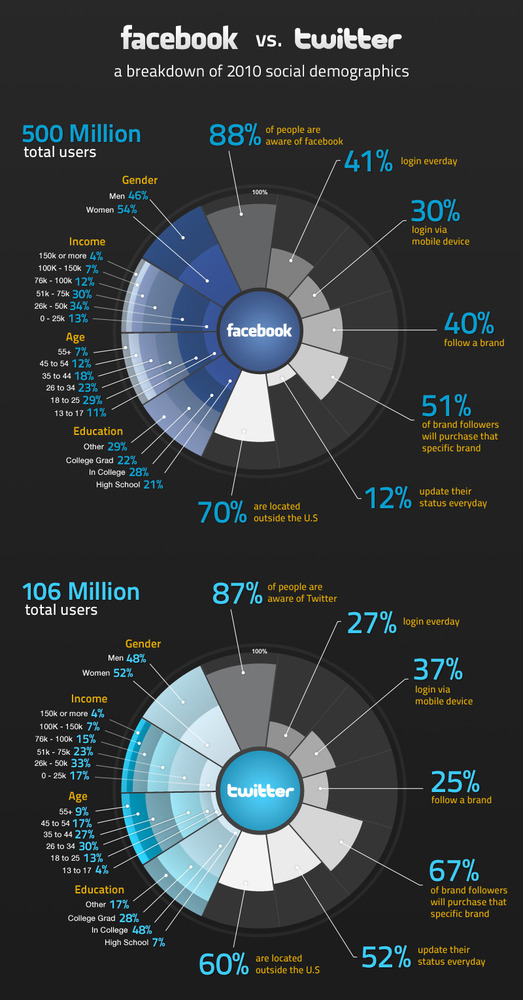
Marketers should make brand ambassadors and promote their creations to drive audiences to embrace them.
The two forms of applications brand ambassadors with development skills are continually embracing are mobile and Facebook applications. The reasons are clear:
Facebook is over 500 million people, and mobile smartphones are used by over 600 million people – Real people: connecting, sharing, and exploring
People continue to be the message more and more. Todays consumer has an auto filter for paid advertising. Leveraging the crowd to create a compelling branded experience is critical to an effective campaign.
Brand missions are to give people the power to create and share their content as the world becomes more connected and technology becomes more accessible.
Looking to the developer community enables brands to create deeper relationships with stronger insights.
So next time you have a brand marketing strategy discussion and you review your various targeted personas – make sure you consider the developer community. They will surprise you with what they do positively for your brand.